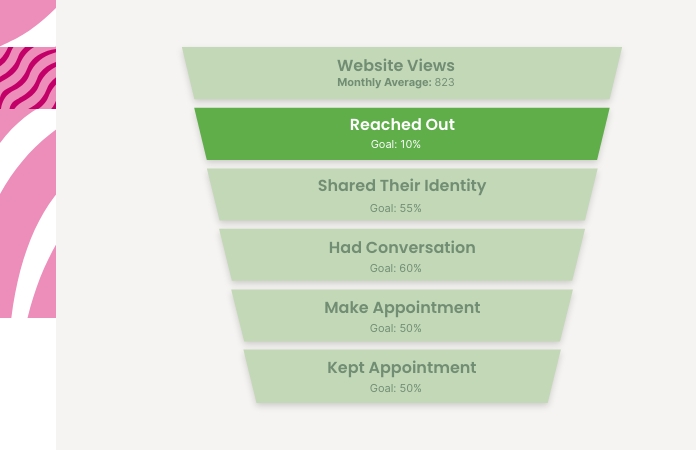
The next step in Her Journey is getting her to take action and reach out to your center.
Outreach (Initiations) includes any first step someone takes to contact your center, such as clicking on the HopeSync widget, submitting a form, sending a text message/calling your HopeSync number. It does not necessarily mean a conversation took place with your staff or that personal information was collected. Rather, it measures the number of people who showed enough interest to initiate contact.
The following checklist is organized from highest to lowest impact, while also considering ease of implementation. Centers looking for the biggest return on their time should focus on the items near the top of the list first.
1. Make It Easy for People to Contact You
This sounds obvious, but many websites unintentionally make outreach harder than it needs to be. Every extra click, scroll, or moment of confusion creates an opportunity for someone to leave the website before taking action.
Best Practices
- Make the next step easy to find from every page. Since scheduling an appointment is your primary goal, place a clear appointment button in the website menu and repeat contact options throughout your website. Visitors should be able to find your form, phone number, or texting option quickly, no matter where they are on the site.
- Offer multiple ways to reach out. Different people prefer different communication methods. Some visitors are comfortable making a phone call, while others may prefer texting or submitting a form online. Do not assume visitors will use the communication method you prefer.
- Do not rely exclusively on the HopeSync website widget to promote texting. Many centers find that a significant portion of text conversations begin when visitors click a hyperlinked phone number within website content rather than through the widget itself.
Why It Matters
Every additional step creates friction. When someone finally decides to contact your center, even a small inconvenience can cause them to postpone taking action.
The easier it is for visitors to connect in the way they feel most comfortable, the more likely they are to reach out while actively seeking help.
2. Optimize for Mobile Users
Many centers find that 60-70% of website visitors access their website from a mobile device. If your website is difficult to use on a phone, you may be losing outreach opportunities without realizing it.
Best Practices
- Review your website on your own phone and consume it through the lens of someone who has no idea who you are or what you do.
- Make sure appointment forms, phone numbers, and texting options are easy to find without excessive scrolling.
- Ensure phone numbers and texting numbers are clickable.
- Avoid placing contact forms so far down the page that visitors must scroll extensively before finding them.
Why It Matters
A visitor who is browsing from a mobile device is often looking for information quickly.
The easier it is to contact your center from a phone, the more likely someone is to reach out while they are actively seeking help.
3. Keep Barriers Low & Communicate Expectations
Many women hesitate to reach out because they are afraid of being judged, rejected, embarrassed, or told they do not qualify for services.
The way your website communicates expectations can either increase or decrease that anxiety.
Best Practices
- When discussing eligibility requirements, focus on the value a visitor will receive rather than leading with restrictions.
Example
Instead of:
"Ultrasounds are only provided to those who qualify by nurse discretion. An ultrasound is not guaranteed."
Consider:
"Not everyone will qualify for an ultrasound due to demand and medical guidelines, but that's okay. Our team can still provide information, support, and connections to resources that fit your unique situation."
- Keep your barrier to entry low. Avoid making visitors navigate different appointment processes for different services whenever possible. For example, requiring someone to call for an ultrasound appointment may unintentionally discourage a person who is only comfortable texting. It is often better to make outreach easy, collect their information, and then guide them through any service-specific requirements after contact has been established.
- Help visitors know what to expect. Fear of the unknown can prevent someone from reaching out. Consider adding a section to your service pages that explains what happens during an appointment, highlights the value of your services, and reassures visitors that your center is a safe, welcoming place where they can ask questions, be heard, and receive support without pressure or judgment.
- Keep your content easy to scan. Most visitors will quickly skim a page to determine whether you provide the services they need and whether your center feels trustworthy. Service pages should clearly explain what you offer, who it is for, and what happens next. Longer educational content can be helpful, but it is often better placed in a blog, FAQ section, or resource library for visitors who want to dive deeper.
Why It Matters
Reducing fear and uncertainty helps visitors move from considering contact to actually taking action.
Remember, the goal is not simply to inform people about your services. The goal is to help them feel comfortable enough to begin a conversation.